

Related Products


Govee LED Smart Light Bulbs, 1000LM RGBWW A19 75W E26 Base 4 Pack


Kasa Smart Light Switch, Single Pole, Need Neutral Wire, HS200P3

Ring Battery Doorbell 2K (newest model) Retinal 2K with wide-angle video, up to 6x Enhanced Zoom, Two-Way Talk, and Built-In Battery, Speckled Gray


Price: $16.99
(as of Oct 03, 2026 17:15:35 UTC – Details)
Product description

TUYA Smart Wi-Fi Home Switch Led Light Universal Module DIY Smart Life Wi-Fi Switch Work with Alexa Google Assistant Smart Life
Functions:
Remote ON/OFF: Turn electrical devices on/off from anywhereApp Support: Free IOS and Android mobile App Smart LifeSync Status: Real time device status provided to AppTiming: Set scheduled/countdown timers to turn on/off at specified timeShare Control: Control your smart home together with your familyScene: Turn on/off a gang of devices one tapSmart Scene: Trigger on/off by temperature, humidity or other environmental conditionsNetwork Support: Control electrical devices over Wi-Fi or 2/3/4G mobile networkVoice Control: Works perfectly with Amazon Alexa
Mandatory Wire Gauge Reminder
Minimum requirement: Use 14 AWG copper core wire for load-side connections.Upgrade requirement: For electrical appliances with power>1500W (120V AC), 12 AWG or thicker wire must be used.
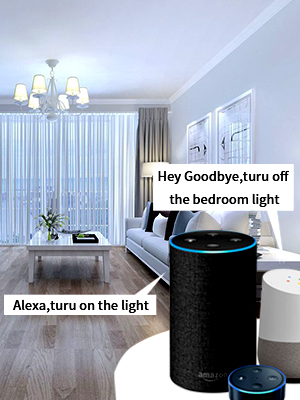
Voice control
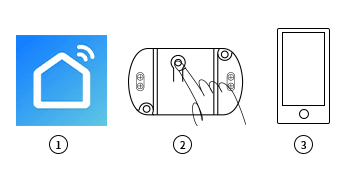 SMART LIFE APP Pairing Instruction
Download “SMART LIFE” app in APP Store for iOS or in Google play for Android.Cut off the power before installing the device. Then power it up after completing the installation.Press the button for 6 seconds until the LED indicator on it flashes quickly.It will auto-search and connect the device.Input home Wi-Fi SSID & password.Name the device to complete.
Works with Amazon Alexa & Google Home Assistant
Control your device through your voice
1.Download Amazon Alexa APP2. Enter your SMART LIFE account and log in.3. All the devices supported by voice control under your account display on Alexa App or Google Home App.4. Name the devices to complete.5. Now, control the connected devices with voice commands.“Alexa, turn on the light.”“Hey Google, turn off the bedroom light.”……
Technical Details
Name Tuya Smart Switch Manufacturer RODOT Part Number KR2201WB Material ABS Voltage AC110V /220V Wattage 2200 watts Wireless networking WIFI (802.11 B/G/N2.4GHZ) APP Smart Life
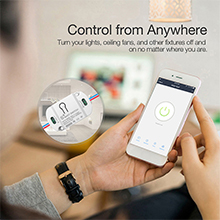
App Remote Control
Via free Smart Life or TUYA Smart App. You can download the iOS version in App Store and the Android version in Google Play. The App Smart Life enables you to control your devices easily .
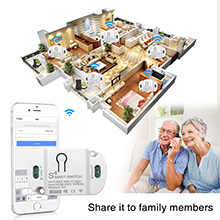
Share Control
Share control of your home appliances to your family or friends so that they can also control the devices remotely.
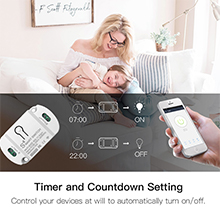
Timer & Schedule
Another feature available if to set timing schedules for the appliances, which can include countdown, scheduled on/off .It’s simple, giving you one less thing to worry about in your busy life. Control your devices at will to automatically turn on/off.

LAN Control
Use LAN control function to turn on/off the device when there is no Wi-Fi network.
HOW TO CONNECT THE DEVICE TO WI-FI ?

DOWNLOAD SMART LIFE APP Power on the smart switch and make sure that the phone is connected to the Wi-Fi network in the 2.4GHz frequency band; turn on the phone’s Bluetooth. Make sure that the device, mobile phone, and router are close to each other. Download and open the App:Search for “Smart Life” in the App Store or scan the code below to download and install the App;For the first download and use, please click the “Create New Account” button to register;If you already have an account, click the “Log in with an existing account” button.
ADD DEVICE TO “Smart life” APP Reset the smart switch: Press and hold the button on the smart switch for more than 6 seconds until the LED indicator on it flashes quickly.Open the “Smart Life” APP, click the “+” in the upper right corner to enter the device addition page, and then select “Auto Scan” (please turn on the Bluetooth function of the phone before performing this operation) to start searching for nearby devices to be added. After discovering the device to be added , The icon and name of the device will appear on the APP page or a prompt page will pop up, then please follow the APP prompts to add the device.After the smart switch is successfully connected to Wi-Fi, you can see the newly added device on the home page of the Smart Life APP.
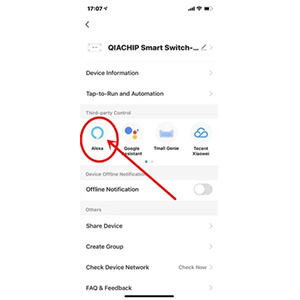
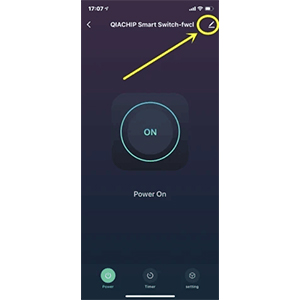
HOW TO CONNECT TO THIRD-PARTY APPLICATIONS SUCH AS ALEXA AND GOOGLE ASSISTANT? When using a third-party smart speaker to connect, you first need to download the third-party APP and register an account, such as Amazon Alexa; then add the device in the “Smart Life APP”, open the device control page, click the upper right corner (see the picture below), and then Jump to the device information page, where you can change the name of the device, and you can see the details of the third-party controlled APP supported by the device, select the APP you need to connect, such as Alexa, click the icon to enter the binding interface, and then press The page prompts the operation.
▶ App Remote Control The RODOT inline smart relay works with your 2.4GHz Wi‑Fi for remote access. Control connected lights and appliances anytime from anywhere via the free Smart Life or Tuya Smart App. Download the app on App Store or Google Play for simple smartphone operation.
▶ Timer & Schedule Function Create custom schedules and countdown timers for your connected devices. This WiFi light switch module supports automated scheduled on/off and countdown routines. Automate your home devices and simplify your daily schedule.
▶ Hands‑Free Voice Control Enjoy convenient hands‑free operation. This DIY smart relay module works seamlessly with Amazon Alexa and Google Home. Use simple voice commands to turn connected lights or appliances on and off for effortless smart home control.
▶ Wide Application for Home Lighting This wireless inline relay works with ceiling lights, garage lights, outdoor landscape lights, string lights, cabinet lamps, hallway lights and bedside fixtures. It also controls ceiling fans, vent fans, water fountains, small water pumps, humidifiers, dehumidifiers and other household devices within 16A current limit. Remotely power devices on or off anytime as long as your phone has internet access.
▶ Universal DIY Inline Retrofit Module,16A Rating No hub required. Rated 100‑240V AC, Max 16A (up to 3500W at 240V). It wires in series on the circuit. Please note the existing wall switch must remain ON to maintain Wi‑Fi connection. Great smart upgrade for users with basic electrical knowledge.
Customers find the smart switch effective and appreciate its easy connectivity, with one mentioning seamless integration with Alexa. They consider it good value for money and like its ease of use, with one customer noting they can control their old dock lighting easily. The device’s reliability receives mixed feedback, with several customers reporting it stopped working within three weeks of installation. Customers have mixed opinions about the fit, with some finding the module tight to install, and the WiFi connectivity, with several customers reporting connectivity issues. The build quality also receives mixed reviews, with some customers describing it as fragile.
There are no reviews yet.